Skip to content

Training

Claude training for business teams, built on your own documents and workflows.

For business users, managers and teams. One-day Foundation workshops through to organisation-wide Enterprise rollouts, on-site anywhere in the UK or remote.

  • Projects, documents, Artifacts and scheduled tasks, taught in the tool your team has
  • Data rules agreed with you before the first session
  • Sessions run on your briefs, reports and processes
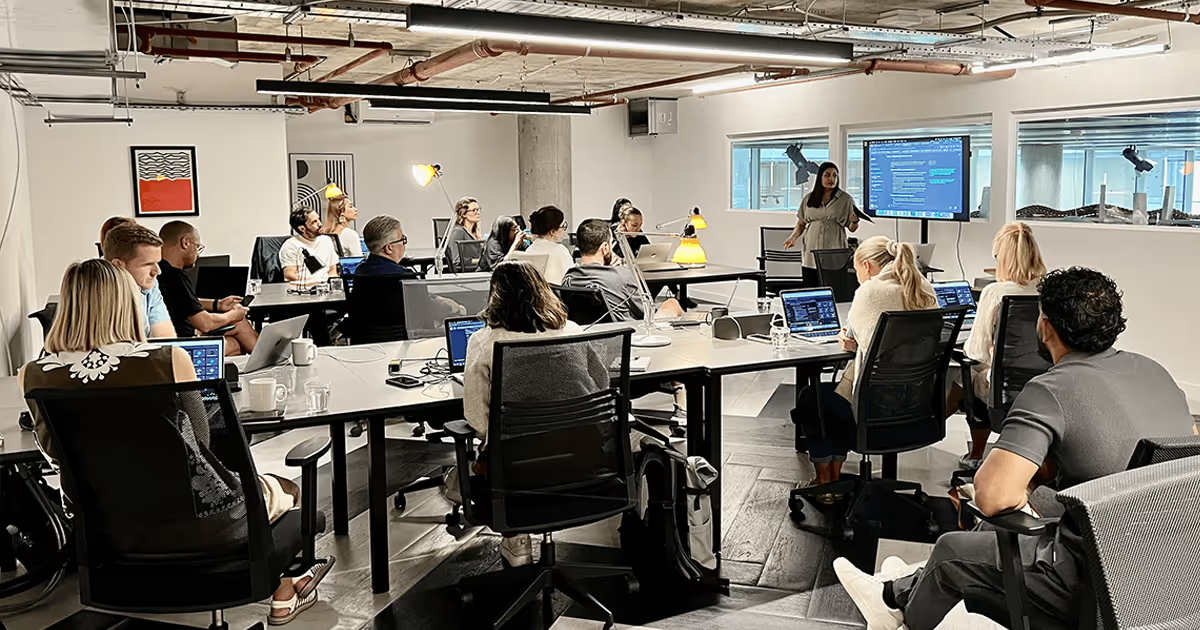
Wide view of delegates at laptops around shared tables in a training room while a presenter stands at the front

Awards

Award winners from Google and Microsoft six years in a row

  • Google Mobile InnovationGlobal Award Winners
  • Google Award for Highest Customer SatisfactionEuropean Award Winners
  • Microsoft Advertising Independent Partner of the YearEuropean Award Winners
  • Best Use of AI in SearchUK Search Awards 2025
  • Best Use of AIUK Agency Awards 2025

Official partners

Accredited by the platforms we run

Where Claude teams get stuck.

And where the training leaves them.

Four patterns the packages are built around.

Without training

  • Licences without adoption: usage stays shallow and occasional, and Claude is treated as a novelty.
  • Inconsistent results: one person gets exceptional output, the next gets mush.
  • Shadow usage and risk: people use AI anyway, with no clear rules on data and checking.
  • Generic training that does not stick, because nothing mapped to their actual job.

After the training

  • Teams that reach for Claude first for drafting, research, analysis and admin.
  • Consistent output quality, whoever is prompting.
  • Clear data rules that people understand and actually follow.
  • Prompt libraries and playbooks that survive staff changes.

Claude training packages

Foundation, Professional and Enterprise.

Some Claude capabilities depend on plan, workspace and admin settings. We tailor the training to the tools your organisation has.

Wide view of delegates at laptops around shared tables in a training room while a presenter stands at the front

01

Claude Foundation

Each person learns to use Claude well on their own work.

  • Individuals and teams getting started with Claude
  • One-day workshop, or two half-day sessions
  • On-site or remote, up to 20 people

Next: Professional, for shared team workflows.

Get a training quote
Three colleagues in an open-plan office, one seated at an orange laptop explaining to a woman and a bearded man leaning in

02

Claude Professional

Claude set up as a shared workspace for the team.

  • Teams that want to embed Claude into everyday workflows
  • Two-day programme plus 30-day follow-up window
  • Role-specific tracks, up to 30 people

Next: Enterprise, for organisation-wide rollout.

Get a training quote
Delegates at laptops around shared tables in a training room while a presenter stands at the front

03

Claude Enterprise

Claude rolled out across departments, with governance in place.

  • Organisations rolling Claude out across multiple departments
  • Multi-week programme, scoped to your rollout
  • Leadership briefing, department tracks and AI champions
Get a training quote

What Foundation covers

Eight modules, one day.

For individuals and teams getting started with Claude.

  1. Module 1

    Claude fundamentals for business

    What Claude does well, choosing the right model and mode for each task, and where it fits alongside the tools you already use.

  2. Module 2

    Prompting that works

    Structuring prompts with role, context, task and format, iterating on output, and building a personal prompt library for the work you repeat.

  3. Module 3

    Extended thinking and reasoning

    When to switch on extended thinking for harder problems, and how to read Claude's reasoning before acting on it.

  4. Module 4

    Documents, PDFs and data analysis

    Working across long documents and PDFs, and extracting, comparing and questioning figures from spreadsheets and reports.

  5. Module 5

    Artifacts for business outputs

    Turning prompts into documents, pages and interactive tools you can share, using research and image analysis as inputs.

  6. Module 6

    Projects and personal knowledge

    Setting up Projects with instructions and files so your recurring work starts from context, not a blank chat.

  7. Module 7

    Scheduled Tasks and recurring workflows

    Automating the reports, summaries and checks you run every week so they arrive without being asked for.

  8. Module 8

    Safe use, verification and hallucination checks

    Data rules, spotting errors and verifying output before anyone else sees it.

What Professional adds

Shared team work.

Two days plus a 30-day follow-up window, in role-specific tracks.

  1. Module 1

    Claude Co-work for collaborative tasks

    Running complex, multi-step tasks with Claude working alongside the team rather than one person at a time.

  2. Module 2

    Shared Projects and team knowledge

    Building department Projects with shared instructions, files and examples, so everyone starts from the same context.

  3. Module 3

    Connectors and business context

    Giving Claude safe access to the systems and knowledge sources your team already works in.

  4. Module 4

    MCP and safe tool-connected workflows

    What the Model Context Protocol makes possible, and the guardrails tool-connected workflows need before they touch real data.

  5. Module 5

    Role-specific workflows

    Marketing, sales, operations and leadership tracks, each built on live tasks participants bring with them.

  6. Module 6

    Team prompt libraries and standards

    A shared library and an agreed quality bar, so output stops depending on who happens to be prompting.

  7. Module 7

    Department playbooks

    Documenting the repeatable Claude workflows your team actually follows, owned and kept current by the team itself.

  8. Module 8

    Adoption habits and measurement

    Champions, sharing rhythms and simple measures of adoption and time saved, backed by the 30-day follow-up window.

What Enterprise adds

Governed rollout across departments.

A leadership briefing, department tracks and AI champions, scoped to your rollout.

  1. Module 1

    Enterprise rollout strategy

    Sequencing which departments adopt Claude first, aligning leaders, and agreeing the measures the rollout is judged on.

  2. Module 2

    Claude Code for technical teams

    Putting Claude Code to work in development: feature builds, debugging and keeping documentation current.

  3. Module 3

    Code review, debugging and documentation

    AI-assisted review and refactoring that raises engineering throughput without lowering the quality bar.

  4. Module 4

    AI agents and automation strategy

    Where agents add value, where they do not, and how to scope the first automation candidates.

  5. Module 5

    Computer Use and controlled execution

    Where Computer Use fits safely into business workflows, and the controls it needs before it runs unattended.

  6. Module 6

    AI governance and compliance

    Turning policy, acceptable use and your compliance obligations into practice teams follow.

  7. Module 7

    Security, data handling and risk controls

    Access boundaries, data handling standards, and review and escalation paths for sensitive work.

  8. Module 8

    AI champions and centre of excellence

    Selecting and equipping internal champions to onboard teams, share practice and carry capability forward.

  9. Module 9

    ROI measurement and continuous improvement

    Tracking adoption, productivity gains and return by department, with quarterly reviews as Claude's capabilities evolve.

Which package covers what

  • Foundation

    Best for
    Individuals getting started
    Format
    One-day workshop
    Claude Chat and Prompting
    Fundamentals
    Artifacts
    Included
    Projects
    Personal Projects
    Scheduled Tasks
    Included
    Claude Co-work
    Not included
    Shared Projects
    Not included
    Connectors
    Not included
    MCP
    Not included
    Claude Code
    Not included
    Computer Use
    Not included
    AI Governance
    Safe-usage rules
    AI Compliance
    Not included
    Rollout Strategy
    Not included
    AI Champions
    Not included
    ROI Measurement
    Not included
  • Professional

    Best for
    Teams embedding Claude in workflows
    Format
    Two-day programme + follow-up
    Claude Chat and Prompting
    Advanced
    Artifacts
    Included
    Projects
    Shared team Projects
    Scheduled Tasks
    Included
    Claude Co-work
    Included
    Shared Projects
    Included
    Connectors
    Included
    MCP
    Included
    Claude Code
    Not included
    Computer Use
    Not included
    AI Governance
    Team standards
    AI Compliance
    Not included
    Rollout Strategy
    Not included
    AI Champions
    Not included
    ROI Measurement
    Adoption measures
  • Enterprise

    Best for
    Organisation-wide rollout
    Format
    Multi-week programme
    Claude Chat and Prompting
    Advanced
    Artifacts
    Included
    Projects
    Organisation-wide
    Scheduled Tasks
    Included
    Claude Co-work
    Included
    Shared Projects
    Included
    Connectors
    Included
    MCP
    Included
    Claude Code
    Included
    Computer Use
    Included
    AI Governance
    Full framework
    AI Compliance
    Included
    Rollout Strategy
    Included
    AI Champions
    Included
    ROI Measurement
    Full ROI measurement

How Claude training runs

Built around your documents, briefs and workflows.

  1. Step 1

    Scope

    A short call to understand your teams, your Claude setup and what you need training to change, then which package fits.

  2. Step 2

    Tailor

    We build your sessions around your real documents, briefs and workflows, and align content with your AI policy and tools.

  3. Step 3

    Deliver

    Hands-on sessions where people apply Claude to live work as they learn, on-site or remote, with role-specific tracks where scoped.

  4. Step 4

    Embed

    Prompt libraries, reference guides and a follow-up window keep new habits in use once the sessions end.

  5. Step 5

    Review

    We review what stuck, what saved time and where to go next, from further training to automation and integration.

Who it suits

Any team doing document work.

Woman wearing a lanyard speaking to an audience with her hands raised in a bright room
  • Marketing teams

    Briefing, content production, campaign analysis and repurposing, with brand standards held. Suits retail, e-commerce and travel teams.

  • Sales teams

    Account research, tailored outreach, call preparation and follow-up, drafted with Claude and finished by the person sending it.

  • Operations teams

    Process documentation, reporting and repetitive admin handled by Claude, so people spend their week on work that needs judgement.

  • Finance and professional services

    Document review, analysis and client communication with the checking discipline regulated and advisory work demands.

  • HR and people teams

    Policies, role descriptions, internal communication and case preparation drafted faster, handled with appropriate confidentiality.

  • Leadership teams

    A shared view of what Claude changes for strategy, risk and how the business runs.

Questions about Claude training

What is Claude AI training?

Claude AI training teaches your teams to use Claude, Anthropic's AI assistant, effectively and safely on their real work. Our courses cover prompt engineering, everyday workflows, Claude Projects, data handling and governance, delivered as hands-on workshops rather than theory.

Do you run Claude workshops in person or online?

Both. We deliver Claude workshops on-site anywhere in the UK and remotely for distributed teams, and often combine the two across a programme. The format follows what works best for your people.

How is this different from generic AI training?

Generic AI training covers concepts across many tools and sticks with none of them. Our training is built specifically for Claude: its models, Projects, file handling and prompting behaviour, and around your team's actual tasks, which is what makes new habits hold.

Do participants need a technical background?

No. Every package is built for everyday business users and meets people wherever their confidence sits. The Enterprise package includes deeper material on Claude Code, agents and Computer Use, pitched for the relevant technical teams.

Which package should we choose?

Foundation builds individual Claude skills for people getting started. Professional turns those skills into team co-working and shared workflows. Enterprise covers organisation-wide rollout, Claude Code, governance and AI compliance. If you are unsure, book a call and we will recommend one, including starting smaller.

Can you train on our own documents and workflows?

Yes, and we insist on it. Sessions run on your briefs, reports and processes, agreed with you in advance, because training on real work is what turns a course into changed behaviour.

How do you handle confidentiality during training?

We agree data rules with you before any session, work within your Claude workspace and AI policy, and teach those same boundaries to participants as part of the course. Sensitive material can be substituted or anonymised where needed.

Do you cover Claude prompt engineering?

Yes. Prompt engineering runs through every package: practical fundamentals in Foundation, team-level standards and tool-connected workflows in Professional, and automation-ready prompting in Enterprise.

We also use ChatGPT and Copilot. Can training cover those?

Yes. This page describes our dedicated Claude training, but many clients run mixed stacks. Our broader AI training covers Claude, ChatGPT and Copilot together, and we can blend the two.

How do we get started?

Book a call. We will look at your teams, your Claude setup and your goals, then propose the right package with a clear scope. If training is not the right first step, we will say so.


Clients

Brands who trust us

30 brands

Get a Claude training quote

Send your team size, your Claude plan and the package you have in mind. We come back with a scoped proposal.

If training is not the right first step, we will say so.

Three colleagues in an open-plan office, one seated at an orange laptop explaining to a woman and a bearded man leaning in